
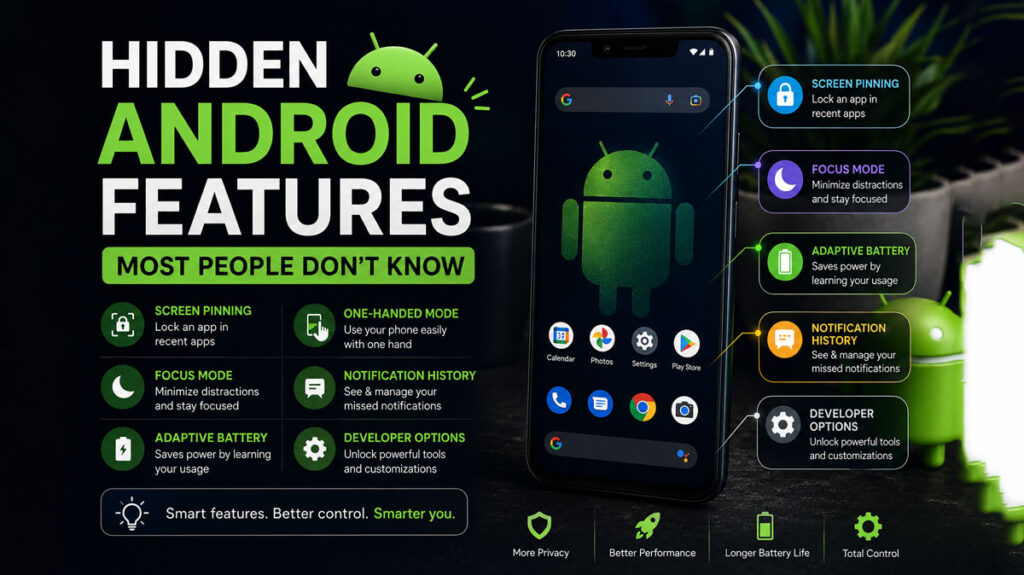
15 Hidden Android Features You Should Start Using
Android smartphones are packed with powerful tools and smart features that many users never discover. Beyond the basic settings and popular apps, Android includes hidden capabilities that can improve privacy, boost battery life, speed up navigation, and personalize your device experience.
Whether you use Samsung, Google Pixel, Xiaomi, OnePlus, or another Android device, these hidden Android features can help you get more from your phone in 2026.
1. App Permission Manager for Better Privacy
Android gives you detailed control over what apps can access.
What You Can Control
- Camera access
- Microphone permissions
- Location tracking
- Contacts and files
- Background activity
Why It Matters
Many apps continue tracking users unnecessarily. Reviewing permissions helps protect your privacy and reduce battery usage.
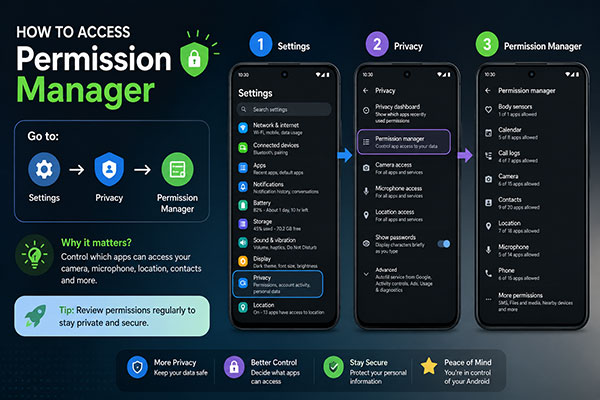
How to Access
Go to:
Settings → Privacy → Permission Manager
You can revoke permissions from apps you don’t fully trust.
2. Hidden Battery Saver Optimization
Most Android users know about Battery Saver mode, but advanced battery optimization settings are often ignored.
Smart Battery Tricks
- Restrict background apps
- Enable Adaptive Battery
- Turn off auto-sync for unused apps
- Use dark mode on OLED screens
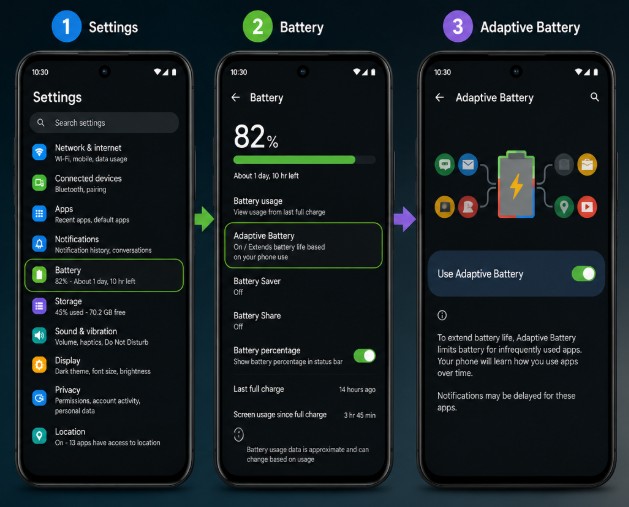
Adaptive Battery Feature
Android learns your usage habits and limits power for apps you rarely use.
How to Enable
Settings → Battery → Adaptive Battery
This feature can significantly improve battery life.
3. Use Gesture Navigation Instead of Buttons
Modern Android phones support gesture-based navigation for a cleaner and faster experience.
Gesture Controls Include
- Swipe up to go home
- Swipe from sides to go back
- Swipe and hold for recent apps
Benefits
- More screen space
- Faster navigation
- Smoother user experience
Enable It Here
Settings → System → Gestures → System Navigation
Once you get used to gestures, traditional buttons feel outdated.
4. Built-In Screen Recorder
Many Android phones now include a hidden screen recording tool.
Useful For
- Recording tutorials
- Capturing gameplay
- Saving video calls
- Sharing technical problems
How to Find It
Swipe down the Quick Settings panel and look for:
Screen Recorder
You can also record internal audio on supported devices.
5. Digital Wellbeing Tools
Android includes built-in tools to help reduce screen addiction and improve focus.
Features Include
- App timers
- Focus Mode
- Bedtime Mode
- Screen time tracking
Why It’s Helpful
These tools help users maintain healthier phone habits and reduce distractions.
Access It Here
Settings → Digital Wellbeing & Parental Controls
6. One-Handed Mode
Large smartphones can be difficult to use with one hand. Android’s hidden one-handed mode solves this problem.
What It Does
Temporarily shrinks the screen for easier thumb access.
Best For
- Multitasking
- Commuting
- Quick messaging
Enable It
Settings → System → Gestures → One-Handed Mode
7. Live Caption for Any Media
Android can automatically generate captions for videos, podcasts, and voice messages.
Why It’s Amazing
- Works offline on many devices
- Useful in noisy environments
- Helps accessibility
Supported Content
- YouTube videos
- Podcasts
- Voice recordings
- Social media clips
Turn It On
Press the volume button and tap:
Live Caption
8. Hidden Developer Options
Developer Options unlock advanced controls and performance settings.
Popular Hidden Features
- Animation speed control
- USB debugging
- Force dark mode
- Background process limits
Speed Up Your Phone
Reducing animation scales can make your device feel faster.
Enable Developer Options
Go to:
Settings → About Phone → Tap “Build Number” 7 times
A new Developer Options menu will appear.
9. AI-Powered Smart Features
Modern Android versions now include powerful AI tools.
AI Features Include
- Smart replies
- Live translation
- Voice typing
- AI wallpapers
- Circle to Search
- AI photo editing
Benefits
AI tools improve productivity and simplify everyday tasks.
Google Assistant Enhancements
AI integration allows faster searches, reminders, and automation.
10. App Pinning for Extra Security
App Pinning locks your phone to a single app screen.
Useful When
- Giving your phone to someone
- Preventing accidental access
- Child-safe browsing
How to Use
- Open Recent Apps
- Tap the app icon
- Select Pin App
This adds an extra layer of privacy.
11. Hidden Customization Features
Android offers deep customization options many users never explore.
Customization Ideas
- Change icon shapes
- Custom widgets
- Dynamic wallpapers
- Color themes
- Lock screen shortcuts
Material You Design
Newer Android versions adapt colors based on your wallpaper.
Where to Customize
Settings → Wallpaper & Style
12. Nearby Share for Fast File Transfers
Nearby Share allows quick wireless file sharing between Android devices.
Share Instantly
- Photos
- Videos
- Documents
- Apps
- Links
Why It’s Better
No cables or third-party apps needed.
Access It
Open the Share menu and choose:
Nearby Share
13. Hidden Emergency Features
Android phones include built-in emergency tools that can save lives.
Emergency Features
- Emergency SOS
- Medical information
- Emergency contacts
- Crash detection on some devices
Why It’s Important
Emergency responders can access critical information even when your phone is locked.
Set It Up
Settings → Safety & Emergency
14. Split Screen Multitasking
Android allows two apps to run simultaneously.
Great For
- Watching videos while chatting
- Taking notes during meetings
- Comparing documents
How to Enable
- Open Recent Apps
- Tap app icon
- Choose Split Screen
This feature boosts multitasking productivity.
15. Smart Lock Features
Smart Lock keeps your device unlocked in trusted situations.
Unlock Methods
- Trusted locations
- Connected devices
- Face detection
- On-body detection
Why Users Love It
Convenient access without constantly entering passwords.
Find It Here
Settings → Security → Smart Lock
Final Thoughts
Android devices are filled with hidden features that most users never fully explore. From privacy controls and AI tools to gesture shortcuts and battery-saving tricks, these built-in features can dramatically improve your smartphone experience.
By learning and enabling these hidden Android settings, you can:
- Increase productivity
- Improve battery life
- Strengthen privacy
- Customize your phone
- Enjoy faster performance
Take some time to explore your Android settings today—you may discover features that completely change how you use your smartphone in 2026.