
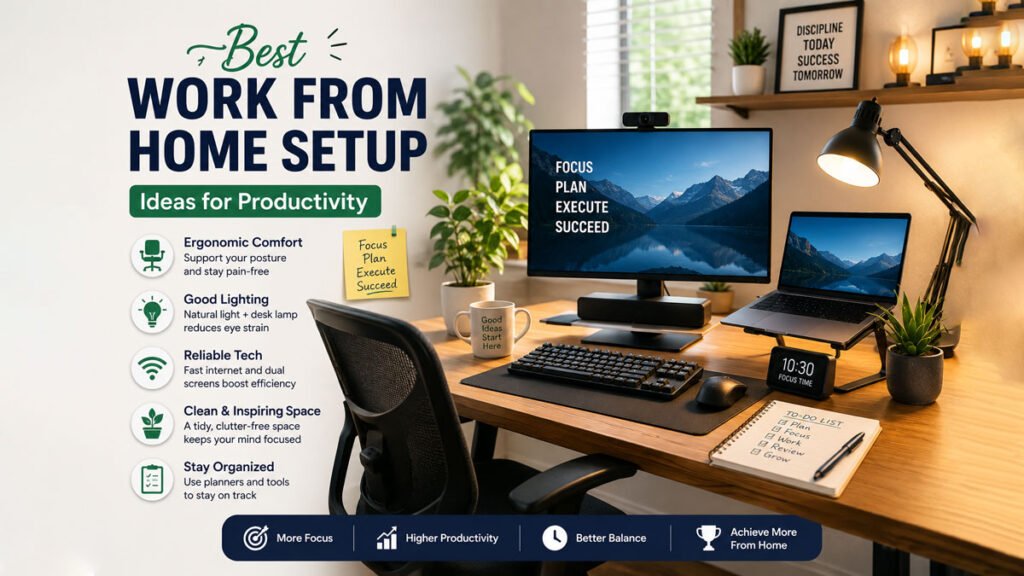
Working from home has become the new normal for freelancers, remote employees, entrepreneurs, and students. But productivity at home depends heavily on your workspace setup. A cluttered desk, poor lighting, and uncomfortable seating can reduce focus and increase stress. Creating a smart and comfortable work-from-home setup can improve concentration, boost efficiency, and support better health.
In this guide, you’ll discover the best work-from-home setup ideas for 2026, including desk organization, ergonomic furniture, lighting solutions, productivity gadgets, cable management tips, and focus strategies.
1. Choose the Right Desk Setup
Your desk is the foundation of your workspace. A clean and organized desk creates a productive environment and helps you stay focused throughout the day.
Ideal Desk Features
- Spacious enough for your laptop or monitor
- Strong and stable build quality
- Adjustable height option if possible
- Storage drawers or shelves for organization
Popular Desk Setup Ideas
- Minimalist white desk with hidden storage
- Standing desk for better posture
- Corner desk for small rooms
- Dual-monitor workstation for multitasking
Desk Organization Tips
- Keep only essential items on the desk
- Use monitor stands to save space
- Add a desk mat for comfort and aesthetics
- Store documents using organizers or trays
A clutter-free desk reduces distractions and helps maintain mental clarity.
2. Improve Lighting for Better Productivity
Lighting directly affects mood, eye comfort, and energy levels. Poor lighting can cause headaches, eye strain, and fatigue.
Use Natural Light Whenever Possible
Place your desk near a window to maximize daylight exposure. Natural light improves mood and keeps you alert during work hours.
Add Layered Lighting
A productive workspace usually combines:
- Ambient room lighting
- Task lighting (desk lamp)
- Accent lighting for aesthetics
Best Lighting Tips
- Use warm white LED lights for comfort
- Avoid direct glare on screens
- Install adjustable desk lamps
- Consider smart lighting systems
Ring Lights for Video Calls
If you attend virtual meetings frequently, a ring light can improve your appearance during video conferences.
3. Invest in an Ergonomic Chair
An uncomfortable chair can lead to back pain, neck strain, and poor posture. Ergonomic seating is one of the most important investments for remote workers.
Features of a Good Ergonomic Chair
- Adjustable seat height
- Lumbar support
- Breathable mesh material
- Adjustable armrests
- Reclining support
Why Ergonomics Matter
Good posture:
- Reduces fatigue
- Prevents long-term injuries
- Improves concentration
- Enhances comfort during long work sessions
Additional Ergonomic Accessories
- Footrest
- Wrist support pads
- Ergonomic keyboard and mouse
- Laptop stand
Creating an ergonomic setup supports both productivity and physical health.
4. Add Productivity Gadgets for a More Efficient Work Setup
Modern productivity gadgets play an important role in improving focus, comfort, and efficiency—especially in remote work and hybrid work environments. The right tools can reduce distractions, streamline workflow, and create a more organized workspace that supports better performance throughout the day.
Why Productivity Gadgets Matter
As remote work becomes more common, having a well-equipped workspace is no longer optional. Productivity gadgets help reduce physical strain, improve multitasking, and minimize interruptions, allowing users to stay focused for longer periods with less effort.
Essential Work From Home Gadgets
Noise-Canceling Headphones
Noise-canceling headphones are essential for blocking out background noise in busy environments. They help improve concentration during meetings, online classes, or deep work sessions by creating a more controlled audio environment.
External Monitor
An external monitor significantly improves productivity by expanding screen space. It allows users to multitask more efficiently, compare documents side by side, and manage multiple applications without constant switching.
Wireless Keyboard and Mouse
Wireless input devices help create a cleaner and more flexible workspace. They reduce cable clutter and improve ergonomics, making long working hours more comfortable.
Smart Speakers
Smart speakers with voice assistants can help manage daily tasks such as setting reminders, checking calendars, playing music, or controlling smart home devices—making workflow more hands-free and efficient.
Webcam and Microphone
High-quality webcams and microphones are essential for professional virtual meetings, presentations, and online communication. They improve clarity, reduce technical issues, and create a more professional appearance.
USB Hubs and Docking Stations
USB hubs and docking stations allow users to connect multiple devices through a single port. This is especially useful for laptops with limited connectivity, helping reduce cable clutter and improve organization.
Smart Productivity Tools
In addition to hardware gadgets, several smart tools can further improve productivity:
- Pomodoro timers for focused work sessions
- Blue light blocking glasses to reduce eye strain
- Smart notebooks for digital note-taking and syncing
- Wireless chargers for clutter-free device charging
How Productivity Gadgets Improve Workflow
The right combination of gadgets helps create a smoother and more efficient workflow by:
- Reducing distractions in the workspace
- Improving multitasking capabilities
- Enhancing comfort during long work sessions
- Keeping the workspace clean and organized
- Saving time on repetitive tasks
Final Thought
Investing in productivity gadgets is not just about convenience—it is about building a workspace that supports focus, efficiency, and long-term productivity. With the right tools, remote work becomes more structured, comfortable, and effective.
5. Master Cable Management
Messy cables can make even the best workspace look disorganized. Proper cable management creates a clean and professional setup.
Cable Management Ideas
- Use cable clips and sleeves
- Label charging cables
- Install under-desk cable trays
- Use wireless accessories when possible
- Keep power strips hidden
Benefits of Cable Organization
- Cleaner appearance
- Safer workspace
- Easier cleaning
- Reduced distractions
A tidy workspace often leads to a more focused mind.
6. Create a Distraction-Free Environment for Better Focus
One of the biggest challenges of working from home is maintaining consistent focus. Without a structured office environment, distractions from social media, household activities, and personal habits can easily reduce productivity. Creating a distraction-free workspace helps improve concentration, efficiency, and overall work quality.
Why a Distraction-Free Environment Matters
A well-structured environment signals your brain that it is time to work. When your surroundings are organized and free from unnecessary interruptions, it becomes easier to stay focused for longer periods and complete tasks more efficiently.
Focus Tips for Remote Workers
Set Dedicated Work Hours
Establishing fixed working hours helps build a consistent routine. When your schedule is predictable, your mind adapts to focused work during those hours and relaxation afterward, improving overall work-life balance.
Use Noise Control Strategies
Noise is one of the most common distractions in remote work environments. You can reduce it by using:
- Noise-canceling headphones
- White noise or ambient sound apps
- Soft instrumental background music
These tools help create a more controlled and focused audio environment.
Separate Work and Personal Space
Working from your bed, sofa, or casual areas can blur the line between relaxation and productivity. A dedicated workspace—even a small desk corner—helps train your mind to associate that area with focused work.
Follow the Pomodoro Technique
The Pomodoro Technique improves concentration by breaking work into short, focused intervals. Typically, you work for 25 minutes followed by a 5-minute break. This cycle helps maintain energy and reduces mental fatigue throughout the day.
Limit Social Media Distractions
Social media is one of the biggest productivity killers. Using website blockers or productivity apps during work hours can help reduce temptation and keep attention focused on important tasks.
Keep Your Workspace Inspiring but Minimal
A motivating environment can improve creativity and focus, but it should not be cluttered. You can enhance your workspace with:
- Indoor plants for a calming atmosphere
- Motivational quotes for positive reinforcement
- Minimal and clean décor for reduced visual distraction
- Personal touches that do not create clutter
Benefits of a Distraction-Free Setup
A well-designed workspace provides several advantages:
- Improved concentration and task completion
- Reduced mental fatigue and stress
- Better time management
- Increased motivation and consistency
- Higher overall productivity
Final Thought
Creating a distraction-free environment is one of the most effective ways to improve remote work performance. With the right habits and workspace setup, you can maintain focus, reduce interruptions, and achieve more in less time.
7. Optimize Your Internet and Tech Setup for Better Remote Work
A stable and well-optimized tech setup is essential for productive remote work. Slow internet, unreliable devices, or poor video call quality can disrupt workflow, reduce efficiency, and create unnecessary stress during important tasks and meetings. Setting up a reliable digital environment ensures smoother communication and uninterrupted productivity.
Why a Strong Tech Setup Matters
Remote work depends heavily on digital tools and internet connectivity. When your system is unstable or underperforming, even simple tasks like attending meetings or uploading files can become frustrating. A well-optimized setup reduces downtime and helps maintain consistent work performance.
Essential Tech Setup Components
High-Speed and Stable Wi-Fi Connection
A fast and reliable internet connection is the foundation of remote work. It ensures smooth video calls, quick file transfers, and uninterrupted access to online tools and cloud services.
Backup Power Source or UPS
Power interruptions can cause data loss or disrupt ongoing work. A backup power source or UPS (Uninterruptible Power Supply) helps keep your devices running long enough to save work and safely shut down systems during outages.
Surge Protector for Device Safety
A surge protector helps safeguard your computer, router, and other devices from sudden voltage spikes. This adds an extra layer of protection for your valuable equipment.
Reliable Laptop or Desktop Setup
A dependable computer with sufficient processing power, memory, and storage ensures smooth multitasking. Regular updates and maintenance also help improve system performance over time.
Cloud Storage Solutions
Cloud storage services allow users to access files from anywhere while ensuring data backup and security. They also make collaboration easier across teams and devices.
Improve Video Call Quality
Clear communication is essential for professional remote work. Improving your video call setup can make a big difference in how you present yourself online.
Position Camera at Eye Level
Placing your camera at eye level creates a more natural and professional appearance during meetings. It improves engagement and visual communication.
Use a Neutral Background
A clean and simple background reduces distractions and helps maintain a professional image during video calls.
Test Microphone Quality
Clear audio is just as important as video quality. Testing your microphone ensures your voice is heard without distortion or background noise.
Upgrade Internet Speed if Needed
If you experience frequent lag or disconnections, upgrading your internet plan or optimizing router placement can significantly improve performance.
Benefits of an Optimized Tech Setup
A well-prepared digital workspace provides several advantages:
- Fewer interruptions during work
- Better video conferencing experience
- Faster workflow and task completion
- Improved reliability and system stability
- Enhanced professional communication
Final Thought
Optimizing your internet and tech setup is a key step toward successful remote work. With the right tools and configurations, you can create a smooth, efficient, and reliable digital environment that supports productivity every day.
8. Add Greenery and Aesthetic Elements to Improve Your Workspace
A well-designed workspace is not just about functionality—it also plays a major role in mood, motivation, and productivity. Adding greenery and simple aesthetic elements can transform a dull desk into an inspiring environment that supports focus and reduces stress.
A visually pleasant workspace helps you feel more comfortable, energized, and motivated throughout the workday.
Why Workspace Aesthetics Matter
Your environment directly influences your mindset. A clean, visually balanced, and naturally inspired workspace can reduce mental fatigue and improve concentration. Even small decorative changes can make long working hours feel more enjoyable and less stressful.
Workspace Decoration Ideas
Small Indoor Plants
Indoor plants are one of the easiest and most effective ways to improve your workspace. They add a natural touch, help create a calming atmosphere, and can even improve air quality in some environments. Low-maintenance plants like snake plants, pothos, or succulents are especially suitable for desks.
LED Light Strips
LED light strips can enhance the mood and visual appeal of your workspace. Soft lighting helps reduce eye strain and creates a modern, comfortable atmosphere, especially during evening work sessions.
Wall Shelves for Organization and Style
Wall shelves provide both storage and decoration benefits. They help keep your desk clean while allowing you to display books, small plants, or decorative items in an organized way.
Minimalist Artwork
Simple and clean artwork can make your workspace feel more personalized without causing visual clutter. Abstract prints, motivational posters, or neutral-toned designs work well for maintaining focus.
Neutral Color Palettes
Using soft, neutral colors in your workspace design helps create a calm and distraction-free environment. Shades like white, beige, gray, and light green are commonly used to promote focus and relaxation.
Benefits of Adding Greenery and Aesthetics
Incorporating natural and aesthetic elements into your workspace can provide several benefits:
- Improved mood and mental well-being
- Reduced stress and anxiety
- Increased creativity and motivation
- More comfortable and inviting workspace
- Better focus during long work sessions
Final Thought
A workspace should feel both functional and inspiring. By adding greenery and simple aesthetic touches, you can create an environment that supports productivity while also making your work experience more enjoyable and balanced.
9Prioritize Comfort and Wellness for Sustainable Productivity
Many remote workers focus heavily on tools, schedules, and productivity hacks—but ignore the physical and mental strain that builds up during long working hours. Over time, this leads to fatigue, poor concentration, back pain, eye strain, and eventually burnout.
That’s why comfort and wellness are not optional—they are a core part of long-term productivity. If your body feels tired and your mind is overloaded, no system or app will keep you productive.
Why Wellness Directly Impacts Productivity
When you sit for long hours without movement, your blood circulation slows down, energy levels drop, and your focus becomes inconsistent. Similarly, dehydration or poor posture can quietly reduce cognitive performance without you realizing it.
This is why many remote workers feel “busy but unproductive”—their environment supports work, but not physical well-being.
9. Practical Wellness Habits for Remote Workers
1. Stretching: Reset Your Body Every 45–60 Minutes
Instead of long breaks, short micro-movements work better. Simple stretches like neck rotations, shoulder rolls, and standing up for 1–2 minutes help prevent stiffness and improve circulation.
Common mistake: Sitting for 3–4 hours straight without movement
Fix: Set a timer or use Pomodoro breaks to reset your posture regularly
2. Hydration: Prevent Silent Fatigue
Even mild dehydration can reduce focus, memory, and alertness. Many people mistake dehydration for tiredness or lack of motivation.
Practical approach: Keep a water bottle within arm’s reach and sip consistently instead of drinking large amounts at once.
3. Walking Breaks: Improve Focus, Not Just Rest
Walking breaks are not just physical recovery—they also improve problem-solving and creativity. A 5–10 minute walk can reset mental overload from screens and meetings.
Best use case: After long meetings or intense focus sessions
4. Posture: The Hidden Productivity Killer
Poor posture doesn’t show immediate effects, but over time it leads to back pain, neck strain, and reduced sitting tolerance.
Simple fix setup:
- Screen at eye level
- Feet flat on the ground
- Back supported by chair
Ignoring posture often leads to long-term discomfort that reduces daily working capacity.
5. Avoid Continuous Sitting
The human body is not designed for uninterrupted sitting. Even if you feel comfortable, staying in one position for too long reduces energy efficiency.
Better approach:
- Alternate sitting and standing when possible
- Move during calls
- Stand during short tasks like reading or reviewing
Best Daily Habits That Actually Sustain Productivity
Build a Consistent Start-of-Day Routine
A predictable morning routine reduces decision fatigue. When your brain doesn’t waste energy deciding what to do first, it enters work mode faster and more smoothly.
Use Food to Stabilize Energy (Not Just Hunger)
Instead of random snacking, structured nutrition helps maintain steady focus.
Better choices:
- Nuts
- Fruits
- Yogurt
- Protein-based snacks
Avoid heavy or sugary foods during peak work hours—they cause energy crashes.
Digital Detox After Work Hours
Constant screen exposure keeps your brain in “alert mode” even after work. This reduces recovery quality.
A proper shutdown routine helps separate work identity from personal time.
End Work at a Fixed Time
One of the biggest remote work mistakes is “infinite work time.” Without boundaries, productivity slowly turns into burnout.
A fixed end time trains your brain to focus better during working hours because it knows time is limited.
Final Insight
Productivity is not maintained by working harder—it is maintained by working in a way that your body can sustain daily. Wellness habits are not productivity hacks; they are the foundation that keeps everything else working.
If your energy, posture, hydration, and mental recovery are stable, productivity becomes natural instead of forced.
Final Thoughts
Creating the perfect work-from-home setup doesn’t require a huge budget. Small improvements like better lighting, ergonomic seating, organized cables, and productivity tools can make a major difference in your daily workflow.
The best remote workspace combines comfort, functionality, and focus. By optimizing your environment, you can work more efficiently, reduce stress, and enjoy a healthier work-life balance in 2026 and beyond.
Whether you’re a freelancer, remote employee, content creator, or student, investing in your workspace is investing in your productivity and success.